

Wrapping dShares™
Learn how to wrap dShares into ERC-20 tokens on HyperEVM and transfer them to HyperCore.
What is wrapping?
Wrapping is the process of converting a native asset into a standardized token format (ERC-20), enabling native assets to interact with smart contracts across multiple chains. Understanding this concept is fundamental to cross-chain asset management.
In the Hyperliquid ecosystem, wrapping allows dShares™ to transition from the native HyperCore trading ledger into standard ERC-20 tokens on HyperEVM. This process works by locking the native dShares asset and minting a wrapped equivalent in return, making the shares compatible with EVM smart contracts and enabling interaction with the broader DeFi ecosystem.
dShares™ cannot be bridged directly to other chains. To move them, you must first wrap them into wrapped dShares and then send the wrapped tokens to a HyperCore bridge.
sequenceDiagram
    actor P as Partner
    participant API as Dinari API
    participant HE as HyperEVM
    participant L1 as Dinari L1
    participant HC as HyperCore
    Note over P,HC: Phase 1 — Purchase the dShare
    P->>API: 1. Request order permit
    API-->>P: Return permit to sign
    P->>API: 2. Submit signed permit
    API->>HE: 3. Submit order on HyperEVM
    HE->>L1: Bridge order to Dinari L1
    L1->>L1: 4. Process order
    L1->>HE: Bridge dShare back to HyperEVM
    Note over P,HC: Phase 2 — Move to HyperCore
    P->>HE: 5. deposit() on wrapped dShare
    HE-->>P: 6. Receive wrapped dShare
    P->>HE: 7. transfer() to bridge address
    HE->>HC: Tokens arrive on HyperCore
Integration guide to wrapping dShares™
To bridge your dShares™, complete three on-chain interactions:
- Approval: Grant the wrapped dShare contract permission to move your dShares. This security step explicitly authorizes how many tokens the contract can spend on your behalf.
- Deposit (wrap): Call the deposit function to exchange your native dShares for their wrapped equivalent. This locks your original assets and mints the corresponding wrapped tokens to your account.
- Bridge: Transfer your newly created wrapped dShares to the HyperCore bridge address, which initiates the cross-chain transfer to your destination.
Addresses for SPCX dShare and wrapped dShare
| Address | Value |
|---|---|
| Native dShare contract | 0x9b4Db2271EB1fa0aEe1abA7ed55E51C38cE514a3 |
| Wrapped dShare contract | 0x95687557C66BC799a850bA7037673528238ae763 |
| HyperEVM to HyperCore bridge address | 0x2000000000000000000000000000000000000262 |
| HyperCore token index | 610 |
Step 1: Approval
Initialize the chain manager and account
Start by initializing the EVM manager for your chain.
import Dinari from '@dinari/api-sdk';
import { ethers } from 'ethers'; // v6

// Dinari API SDK is used to linked your wallet to your account
const client = new Dinari({
  apiKeyID: process.env['DINARI_API_KEY_ID'],
  apiSecretKey: process.env['DINARI_API_SECRET_KEY'],
});

// HyperEVM mainnet is chain ID 999. Use the testnet RPC only if testing on 998.
const provider = new ethers.JsonRpcProvider('https://rpc.hyperliquid.xyz/evm');
const wallet = new ethers.Wallet(process.env['WALLET_PRIVATE_KEY']!, provider);

// Set these to the dShare being wrapped and its wrapped dShare on the target chain.
const dshareAddress = 'dShare-Address';
const wrappedDshareAddress = 'your-wrapped-dShare-address';
Load the native and wrapped dShare contracts
- See the ERC-20 spec: https://eips.ethereum.org/EIPS/eip-20
- See the ERC-4626 spec: https://eips.ethereum.org/EIPS/eip-4626
// Generic ERC20 Interfaces
const ERC20_ABI = [
  'function allowance(address owner, address spender) view returns (uint256)',
  'function approve(address spender, uint256 amount) returns (bool)',
  'function balanceOf(address owner) view returns (uint256)',
  'function decimals() view returns (uint8)',
  'function transfer(address to, uint256 amount) returns (bool)',
];

// Create the Wrapped ABI for the Existing Contract
const WRAPPED_ABI = [...ERC20_ABI, 'function deposit(uint256 assets, address receiver) returns (uint256 shares)'];

const dshare = new ethers.Contract(dshareAddress, ERC20_ABI, wallet);
const wrappedDshare = new ethers.Contract(wrappedDshareAddress, WRAPPED_ABI, wallet);
Link your wallet to your Account
// Link your wallet to your Dinari account -this is required to use the API.
async function main() {
  const accountID = 'your-account-id';
  const nonceResp = await client.v2.accounts.wallet.external.getNonce(accountID, {
    wallet_address: wallet.address,
  });

  // Sign the nonce message to prove ownership
  const signature = await wallet.signMessage(nonceResp.message);

  // Connect you wallet to your Dinari Account using the signed nonce
  await client.v2.accounts.wallet.external.connect(accountID, {
    chain_id: 'eip155:999',
    nonce: nonceResp.nonce,
    signature,
    wallet_address: wallet.address,
  });
Set the total amount of shares to wrap and contract decimals
  // Set the total amount of shares to wrap and contract decimals
  const decimals = await dshare.decimals();
  const totalAmount = ethers.parseUnits('10', decimals);
Now you can sign your approval
  const currentAllowance = await dshare.allowance(wallet.address, wrappedDshareAddress);
  if (currentAllowance < totalAmount) {
    const approveTx = await dshare.approve(wrappedDshareAddress, totalAmount);
    await approveTx.wait();
  }
Step 2: Deposit (wrap)
Specify the amount of native dShares you intend to wrap and deposit them into the wrapped dShare contract. The contract mints wrapped dShares to your account in return.
// Wrapping spends native dShares, so validate the native dShare balance.
const balance = await dshare.balanceOf(wallet.address);
	if (balance < totalAmount) {
  	throw new Error(`Insufficient dShare balance: have ${balance}, need ${totalAmount}`);
}

// Your deposit needs the total amount of shares to wrap and the receiver address on the target chain.
const wrappedBefore = await wrappedDshare.balanceOf(wallet.address);
const depositTx = await wrappedDshare.deposit(totalAmount, wallet.address);
await depositTx.wait();
const wrappedAfter = await wrappedDshare.balanceOf(wallet.address);
const mintedAmount = wrappedAfter - wrappedBefore;
Step 3: Transfer to the HyperCore bridge
Transfer the wrapped tokens to the HyperCore bridge address. This initiates the cross-chain transfer. Bridge the amount that was actually minted in Step 2 (minted_amount), send it to the correct bridge address, and verify the transaction on-chain so the bridge can process and finalize the transfer.
const bridgeAddress = 'target-bridge-address';
const transferTx = await wrappedDshare.transfer(bridgeAddress, mintedAmount);
await transferTx.wait();
Complete reference script
This is the complete, uninterrupted script for bridging a dShare to HyperCore:
import Dinari from '@dinari/api-sdk';
import { ethers } from 'ethers'; // v6

// Dinari API SDK (REST): used here to link the wallet to your account.
const client = new Dinari({
  apiKeyID: process.env['DINARI_API_KEY_ID'],
  apiSecretKey: process.env['DINARI_API_SECRET_KEY'],
});

// HyperEVM mainnet is chain ID 999. Use the testnet RPC only if testing on 998.
const provider = new ethers.JsonRpcProvider('https://rpc.hyperliquid.xyz/evm');
const wallet = new ethers.Wallet(process.env['WALLET_PRIVATE_KEY']!, provider);

// Set these to the dShare being wrapped and its wrapped dShare on the target chain.
const dshareAddress = 'dShare-Address';
const wrappedDshareAddress = 'your-wrapped-dShare-address';

// Minimal ERC-20 (dShare) and ERC-4626 (wrapped dShare) interfaces.
// See tje ERC-20 spec: https://eips.ethereum.org/EIPS/eip-20
// See the ERC-4626 spec: https://eips.ethereum.org/EIPS/eip-4626
const ERC20_ABI = [
  'function allowance(address owner, address spender) view returns (uint256)',
  'function approve(address spender, uint256 amount) returns (bool)',
  'function balanceOf(address owner) view returns (uint256)',
  'function decimals() view returns (uint8)',
  'function transfer(address to, uint256 amount) returns (bool)',
];
const WRAPPED_ABI = [...ERC20_ABI, 'function deposit(uint256 assets, address receiver) returns (uint256 shares)'];


const dshare = new ethers.Contract(dshareAddress, ERC20_ABI, wallet);
const wrappedDshare = new ethers.Contract(wrappedDshareAddress, WRAPPED_ABI, wallet);

// Link your wallet to your Dinari account -this is required to use the API.
async function main() {
  const accountID = 'your-account-id';
  const nonceResp = await client.v2.accounts.wallet.external.getNonce(accountID, {
    wallet_address: wallet.address,
  });

  // Sign the nonce message to prove ownership
  const signature = await wallet.signMessage(nonceResp.message);

  // Connect you wallet to your Dinari Account using the signed nonce
  await client.v2.accounts.wallet.external.connect(accountID, {
    chain_id: 'eip155:999',
    nonce: nonceResp.nonce,
    signature,
    wallet_address: wallet.address,
  });

  // Set the total amount of shares to wrap and contract decimals
  const decimals = await dshare.decimals();
  const totalAmount = ethers.parseUnits('10', decimals);

  // --- Step 1: Approval ---
  const currentAllowance = await dshare.allowance(wallet.address, wrappedDshareAddress);
  if (currentAllowance < totalAmount) {
    const approveTx = await dshare.approve(wrappedDshareAddress, totalAmount);
    await approveTx.wait();
  }

  // --- Step 2: Deposit (wrap) ---
  // Wrapping spends native dShares, so validate the native dShare balance.
  const balance = await dshare.balanceOf(wallet.address);
  if (balance < totalAmount) {
    throw new Error(`Insufficient dShare balance: have ${balance}, need ${totalAmount}`);
  }

  // Your deposit needs the total amount of shares to wrap and the receiver address on the target chain.
  const wrappedBefore = await wrappedDshare.balanceOf(wallet.address);
  const depositTx = await wrappedDshare.deposit(totalAmount, wallet.address);
  await depositTx.wait();
  const wrappedAfter = await wrappedDshare.balanceOf(wallet.address);
  const mintedAmount = wrappedAfter - wrappedBefore;

  // --- Step 3: Transfer to the HyperCore bridge ---
  const bridgeAddress = 'target-bridge-address';
  const transferTx = await wrappedDshare.transfer(bridgeAddress, mintedAmount);
  await transferTx.wait();
}
Wrapping Using Hyper Explorer
One alternative to programmatic wrapping, is using Hyper Explorer to wrap a dShare by utilizing Proxy Contract Interactions on HyperEVM with the token you intend like to wrap. The same high level steps are performed, however they are performed as contract interactions on the hyperevm scan page. In this example, we're using SpaceX (SPCX)
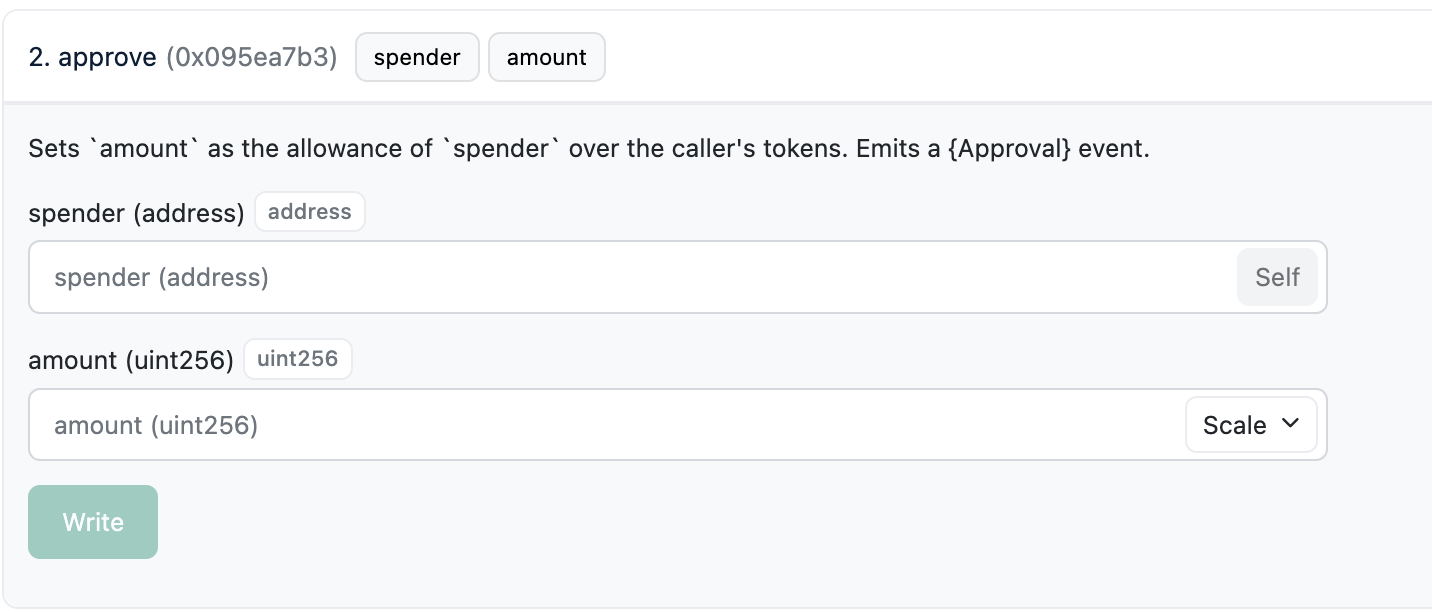
Step 1: Provide Approval to your Connected Wallet
Navigate to the contract page on HyperEVM Scan for the SPCX Token and utilize the approve() function call.
For example SPCX (SpaceX Wrapped Token). Navigate to its token listing on HyperEVM Scan, navigate to the Contract Page, and select Write As Proxy. Go to the Approve Function and set the spender to the wrapped token contract address and the amount you want to wrap.
For SpaceX the wrapped token contract address is: 0x95687557C66BC799a850bA7037673528238ae763
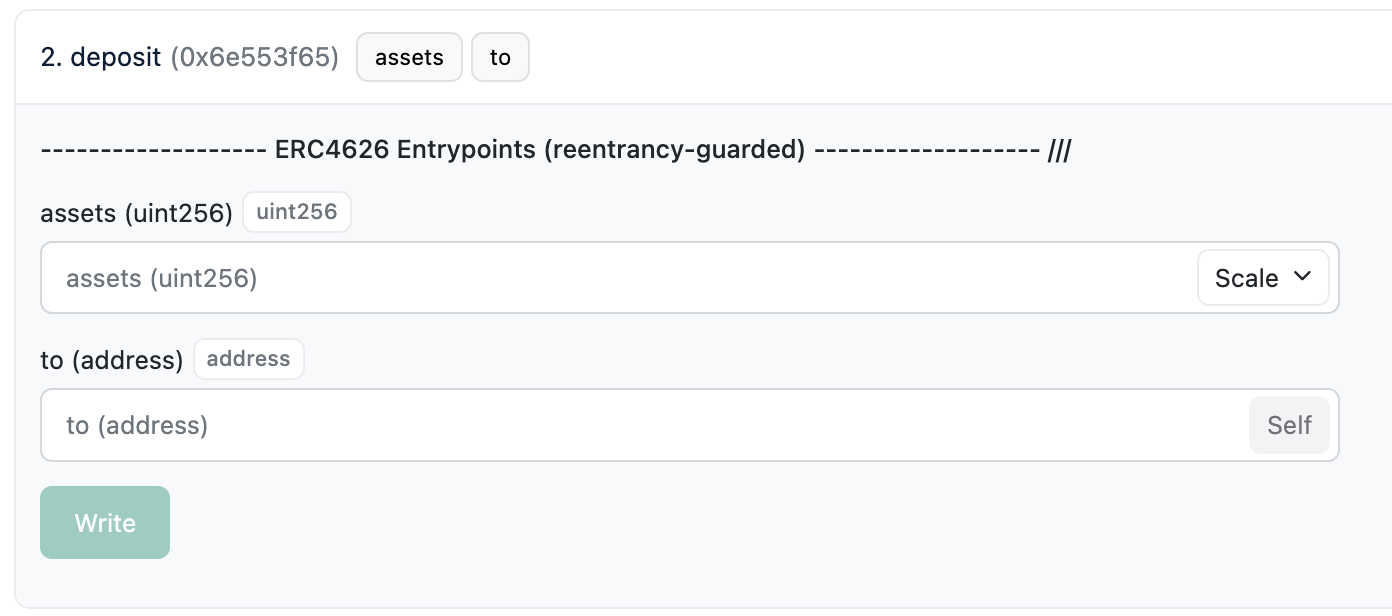
Step 2: Perform the Deposit
Call the deposit function on the same page with the assets set to the number of dShares you want to wrap and the to address. Direct Link for SpaceX Deposit Function
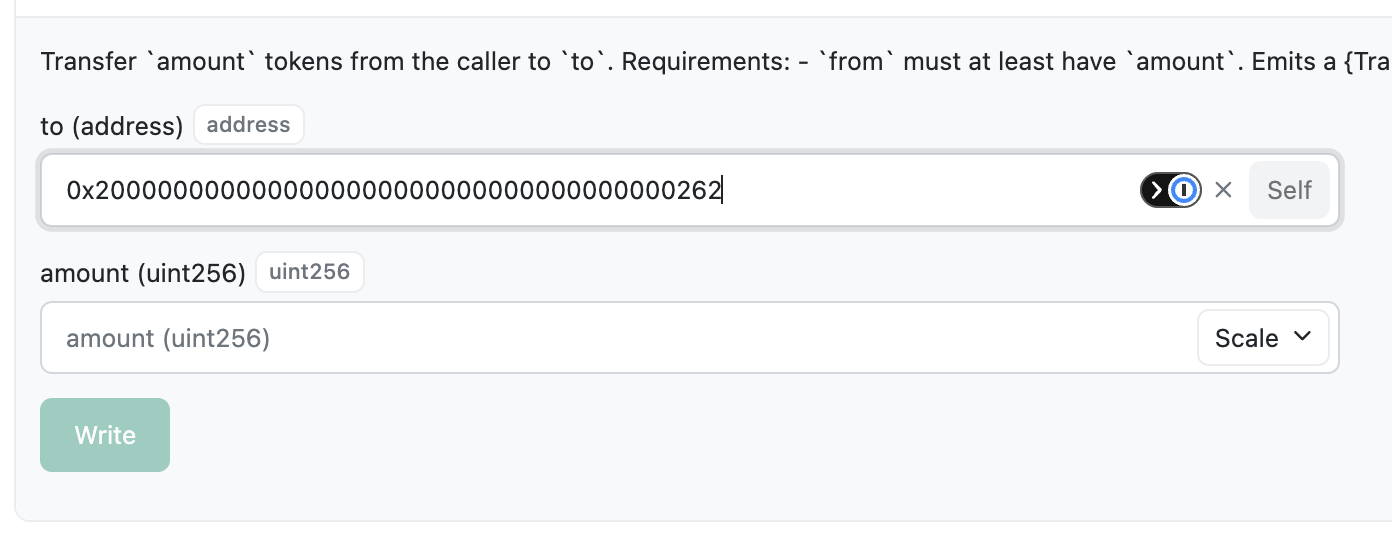
Step 3: Transfer the Tokens
Call the transfer function for the token with the transfer address set to the assets HyperEVM Bridge Address, for SPCX this is 0x2000000000000000000000000000000000000262, and amount set to the amount of wrapped dShares retrieved from previous call. Direct Link for SpaceX Transfer Function
Note: This address changes depending on the token. Be sure you provide the specific address for the dShare you're wrapping.
Updated 4 months ago