

Managing Wallets
A Wallet represents a wallet on a blockchain. For trading activities to be tracked in Dinari, a wallet must be linked to an Account. The following section provides examples on how to manage wallets on an account. Please note that to manage your organization's wallet, an account id that is linked to the entity id provided in your dashboard must be used.
Dinari-managed Wallets
This will only work on your organization's accounts
To create a Dinari-managed wallet, visit your dashboard and do the following:

- Click on
Create Account

- On the row for the new Account created, click on
+ Connect Wallet
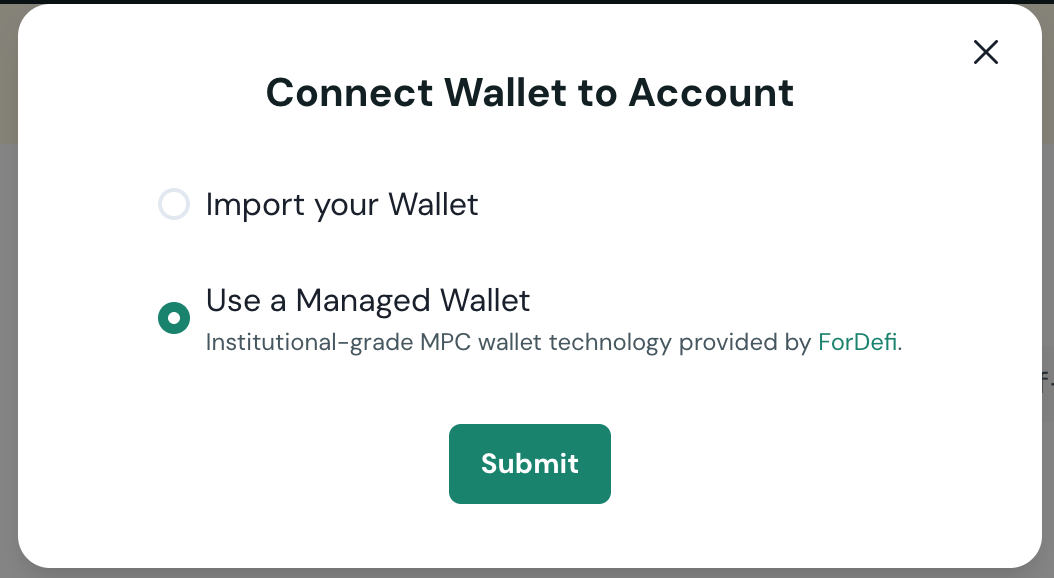
- A modal will pop up. Select
Use a Managed Walletand clickSubmit
External Wallets
SDK Reference
SDK Examples
Connecting a Wallet to an Account
import { DinariClient, DinariEnvironment } from "@dinari/api-sdk";

const client = new DinariClient({
  apiKeyId: process.env.DINARI_API_KEY_ID!, // This is the default and can be omitted
  apiSecretKey: process.env.DINARI_API_SECRET_KEY!, // This is the default and can be omitted
  environment: DinariEnvironment.Sandbox, // defaults to DinariEnvironment.Production
});

async function main() {
  const accountId = "your-account-id";
  const walletAddress = "your-wallet-address";

  // Step 1: Get the nonce message to sign
  const nonceResp = await client.wallets.getAccountWalletConnectionNonce({
    accountId,
    walletAddress,
    chainId: "eip155:1",
  });

  // Step 2: Sign the message (replace this with actual off-chain signing)
  const signature = "your-wallet-signature"; // Sign nonceResp.message with the wallet

  // Step 3: Connect the wallet using the signed message
  const linkedWallet = await client.wallets.createAccountWalletConnection({
    accountId,
    chainId: "eip155:1",
    nonce: nonceResp.nonce,
    signature,
    walletAddress,
  });

  console.log(linkedWallet);
}

main();
import os
from dinari_api_sdk import DinariClient
from dinari_api_sdk.environment import DinariClientEnvironment
client = DinariClient(
api_key_id=os.environ["DINARI_API_KEY_ID"], # This is the default and can be omitted
api_secret_key=os.environ["DINARI_API_SECRET_KEY"], # This is the default and can be omitted
environment=DinariClientEnvironment.SANDBOX, # defaults to DinariClientEnvironment.PRODUCTION
)
account_id = "your-account-id"
wallet_address = "your-wallet-address"
# Step 1: Get the nonce message to sign
nonce_resp = client.wallets.get_account_wallet_connection_nonce(
account_id=account_id,
wallet_address=wallet_address,
chain_id="eip155:1",
)
# Step 2: Sign the message (replace this with actual off-chain signing)
signature = "your-wallet-signature" # Sign nonce_resp.message with the wallet
# Step 3: Connect the wallet using the signed message
linked_wallet = client.wallets.create_account_wallet_connection(
account_id=account_id,
chain_id="eip155:1",
nonce=nonce_resp.nonce,
signature=signature,
wallet_address=wallet_address,
)
print(linked_wallet)package main
import (
"context"
"fmt"
"log"
"os"
dinari "github.com/dinaricrypto/dinari-api-sdk-go"
client "github.com/dinaricrypto/dinari-api-sdk-go/client"
option "github.com/dinaricrypto/dinari-api-sdk-go/option"
)
func main() {
c := client.NewDinariClient(
option.WithBaseURL(dinari.Environments.Sandbox), // Defaults to production when omitted
option.WithAPIKeyID(os.Getenv("DINARI_API_KEY_ID")),
option.WithAPISecretKey(os.Getenv("DINARI_API_SECRET_KEY")),
)
accountID := "your-account-id"
walletAddress := "your-wallet-address"
// Step 1: Get the nonce message to sign
nonceResp, err := c.Wallets.GetAccountWalletConnectionNonce(context.Background(), &dinari.GetAccountWalletConnectionNonceRequest{
AccountID: accountID,
WalletAddress: walletAddress,
ChainID: dinari.WalletChainIDEip1551,
})
if err != nil {
log.Fatalf("Failed to get wallet nonce: %v", err)
}
// Step 2: Sign the message (replace this with actual off-chain signing)
signature := "your-wallet-signature" // Sign nonceResp.Message with the wallet
// Step 3: Connect the wallet using the signed message
linkedWallet, err := c.Wallets.CreateAccountWalletConnection(context.Background(), &dinari.CreateAccountWalletConnectionInput{
AccountID: accountID,
ChainID: dinari.WalletChainIDEip1551,
Nonce: nonceResp.Nonce,
Signature: signature,
WalletAddress: walletAddress,
})
if err != nil {
log.Fatalf("Failed to connect external wallet: %v", err)
}
fmt.Printf("Linked Wallet: %+v\n", linkedWallet)
}import com.dinari.api.DinariClient;
import com.dinari.api.core.Environment;
import com.dinari.api.resources.wallets.requests.CreateAccountWalletConnectionInput;
import com.dinari.api.resources.wallets.requests.GetAccountWalletConnectionNonceRequest;
import com.dinari.api.types.WalletChainId;
public class Main {
public static void main(String[] args) {
DinariClient client = DinariClient.builder()
.environment(Environment.SANDBOX) // defaults to Environment.PRODUCTION
.apiKeyId(System.getenv("DINARI_API_KEY_ID")) // This is the default and can be omitted
.apiSecretKey(System.getenv("DINARI_API_SECRET_KEY")) // This is the default and can be omitted
.build();
String accountId = "your-account-id";
String walletAddress = "your-wallet-address";
// Step 1: Get the nonce message to sign
var nonceResp = client.wallets().getAccountWalletConnectionNonce(
accountId,
GetAccountWalletConnectionNonceRequest.builder()
.walletAddress(walletAddress)
.chainId(WalletChainId.EIP1551)
.build());
// Step 2: Sign the message (replace this with actual off-chain signing)
String signature = "your-wallet-signature"; // Sign nonceResp.getMessage() with the wallet
// Step 3: Connect the wallet using the signed message
var linkedWallet = client.wallets().createAccountWalletConnection(
accountId,
CreateAccountWalletConnectionInput.builder()
.signature(signature)
.nonce(nonceResp.getNonce())
.walletAddress(walletAddress)
.chainId(WalletChainId.EIP1551)
.build());
System.out.println(linkedWallet);
}
}Updated 13 days ago
Did this page help you?